A customer may request one service today and return for two more next week. If your team records each request in a different spreadsheet, message thread or paper file, it can become difficult to see the full customer relationship and the status of each service.
The practical approach is to maintain one reliable customer record while tracking each service request as a distinct item. This helps your team understand what was requested, what remains pending, what has been completed and which items need to be reviewed before billing.
For UAE service businesses—including typing centres, ID centres, travel agencies, PRO service providers, document-clearing businesses and business setup companies—this approach can make daily operations easier to organize. The exact process depends on the services offered and the business's billing arrangements.
Why Managing Multiple Services for One Customer Can Become Difficult
Customer information gets duplicated
When a customer requests a new service, employees may create another customer entry instead of checking the existing record. Over time, duplicate names and contact details make it harder to review previous transactions and identify the correct customer record.
Use a consistent process to search for an existing customer before creating a new profile. If duplicate records already exist, review them carefully before merging or correcting anything.
Different service dates become difficult to follow
One service may be completed immediately while another requires additional documents, external processing or a later appointment. Recording both as one undifferentiated task makes it harder to identify the next action for each request.
Each service should have enough information to distinguish it from the customer's other requests, including its description, relevant date, current status and next action.
Pending work can be overlooked
A pending request may remain in a notebook, an employee's messages or a spreadsheet that other team members rarely check. Follow-up then depends too heavily on memory and individual habits.
Regularly reviewing open requests helps the team identify what is waiting for documents, processing, customer confirmation or another action. Use status labels that reflect the process your business actually follows.
Billing records become harder to reconcile
A customer may receive several services before billing, but not every service should automatically be placed on the same invoice. The right approach depends on the work completed, agreed charges, customer requirements and applicable invoicing rules.
Before billing, check which service items are ready to be invoiced and whether any have already been billed. Keeping the service details identifiable makes this review easier.
How to Organize Multiple Services Under One Customer
1. Maintain one accurate customer profile
Keep the information used to identify and contact a customer in one reliable profile wherever your system supports it. Depending on the business, this may include the customer's name, contact details, relevant reference information and links to service or billing records.
Avoid creating a new customer record merely because a new service is requested. At the same time, do not combine two people or businesses simply because their names look similar. Verify the identity using information your business is permitted to collect and use.
For more guidance, read How to Organize Customer Records for a Service Business .
2. Keep each service request distinct
A customer can have several active or completed services. Each request should remain identifiable even when all requests belong to the same customer.
Useful details may include:
- Service name or description
- Request date and relevant service date
- Required documents or information
- Responsible employee, where relevant
- Current status and next action
- Related quotation or invoice reference
Use the details that matter to your actual workflow. The goal is to distinguish each request without unnecessarily duplicating the customer's core information.
For example, one customer may request document clearing, a visa application and business setup support. These are three different service requests, even though they belong to the same customer.
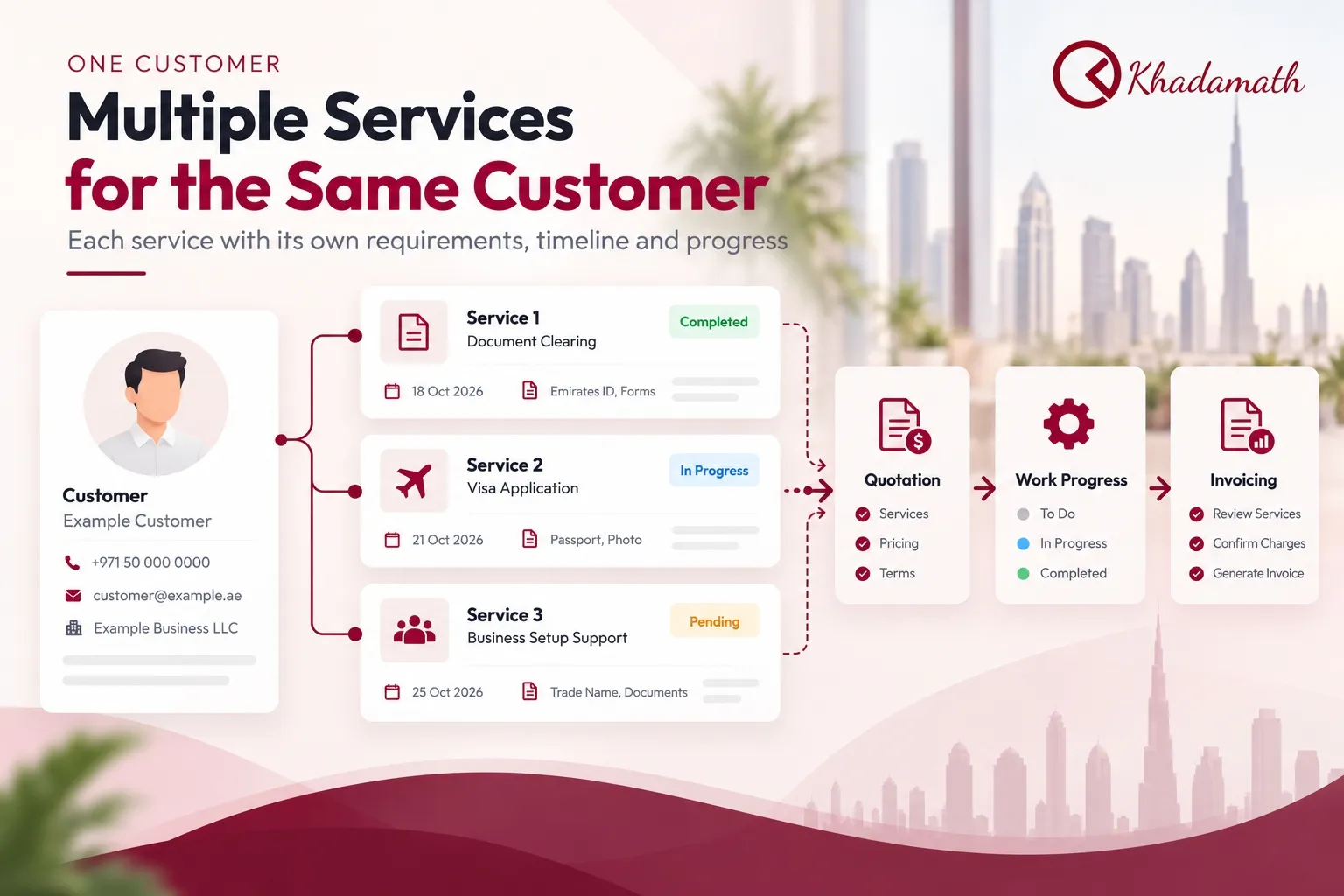
The customer details, dates and status labels shown in the infographic are illustrative examples.
3. Record status and the next action
A service name alone does not tell the team what should happen next. Use consistent status definitions and record the next action for each open item.
- Waiting for information: The customer needs to provide a required document or detail.
- In progress: The service is being processed.
- Completed: The service work has been completed.
- Ready for billing review: The service details and agreed charges need to be checked before invoicing.
These are general workflow examples, not a claim that every software product uses these exact statuses.
Review pending requests regularly so employees can identify what needs attention and avoid treating an unfinished service as completed.
A Practical Workflow for Managing Multiple Services
1. Record the customer's request
When a customer asks for another service, check the existing customer record first. Record the new request separately and capture the details needed to process it.
This allows the team to maintain continuity with the customer without confusing the new request with earlier work.
2. Prepare and track quotations
If the service requires a quotation, record the proposed work and charges clearly. When a customer requests several services, make sure the quotation reflects the agreed scope and identifies the relevant service items.
Do not assume that every request has been approved simply because a quotation has been prepared. Keep the quotation's outcome clear within your actual workflow.
For more detail, read Quotation Management: How Service Businesses Can Create, Track and Manage Quotes .
3. Monitor pending and completed work
Review each service request according to its own progress. One request may be completed while another is waiting for information or processing.
A simple review should answer three questions:
- What has been completed?
- What is still pending?
- What action is needed next?
This is especially useful when several employees handle different services for the same customer.
4. Review service items before invoicing
Before preparing an invoice, check the services being billed, the agreed charges, any applicable adjustments and whether the items have already been invoiced.
Service completion, invoice issuance and payment are separate events. A completed service is not necessarily paid, and an issued invoice does not automatically mean that payment has been received.
For a more detailed guide, read How to Automate Billing and Invoicing for a Service Business .
5. Record payment and follow-up separately
After invoicing, record the payment status according to your business's process. If an amount remains outstanding, keep it identifiable so the team can follow up appropriately.
Do not mark a service as paid simply because the work is complete or an invoice has been generated.
For practical guidance, read How to Track Outstanding Payments in a Service Business .
Example: One Customer Requesting Three Different Services
Consider a UAE service business working with one customer who requests three services during the same month.
| Service request | Example date | Example status | Next action |
|---|---|---|---|
| Document clearing | 18 October | Completed | Review billing details |
| Visa application | 21 October | In progress | Check current processing requirements |
| Business setup support | 25 October | Pending | Confirm required information |
This is an illustrative example, not a record of an actual customer or a prescribed operational timeline.
The important point is that all three services belong to the same customer, but each has its own date, progress and next action.
The team can maintain one customer profile while reviewing the three service requests individually. When billing time arrives, it can determine which items are ready to invoice and whether separate or consolidated billing is appropriate.
Should You Use Separate Invoices or One Combined Invoice?
The choice depends on the services provided, the customer's agreement, the timing of the work and applicable invoicing requirements.
When separate invoices may be appropriate
Separate invoices may be more suitable when services have different billing arrangements, need separate documentation or must be invoiced independently under the applicable requirements.
They can also make individual service charges easier to review when the work is handled at different times.
When consolidated billing may be suitable
A single invoice may be convenient when multiple service items belong to the same customer and the agreed billing arrangement permits them to be billed together.
Before combining items, check that the services, dates, charges and customer details are accurate. Confirm that the invoice reflects the work and terms agreed with the customer.
Do not assume that every service can be combined into one invoice. Where UAE VAT or other invoicing requirements are relevant, verify the applicable rules for the particular transaction.
Spreadsheet vs Service Business Software
Spreadsheets can be sufficient for a small operation with limited service requests and a straightforward process. Difficulties may arise when several employees update different records, services remain pending across multiple dates or billing information is maintained separately.
| Area | Spreadsheet-based process | Dedicated service-business software |
|---|---|---|
| Customer information | Depends on how records are maintained | May provide a central customer-record workflow |
| Multiple services | Requires consistent manual organization | May support distinct service records |
| Quotations | Often tracked using separate files or entries | May connect quotation workflows with customer records |
| Pending work | Relies on the team's review process | May provide service or work-tracking capabilities |
| Billing review | Requires checking relevant records manually | May connect service, draft and invoice workflows |
| Reporting | Often requires manual consolidation | Depends on the reports available in the chosen system |
The capabilities of software differ by product and plan. Evaluate the actual workflow rather than assuming that every system provides the same functions.
What to Look for in Software for Multiple Customer Services
If your business is considering dedicated software, assess whether it can support the following needs:
- A reliable customer record that employees can identify consistently.
- Distinct records for individual services requested by the same customer.
- Quotation preparation and review.
- A clear way to understand pending and completed work.
- Draft and invoicing workflows suited to your billing arrangements.
- Relevant reports for reviewing customer, service and billing information.
- Appropriate access for employees who handle customer requests and accounts.
Before choosing a system, test it with a realistic example: one customer requests three services on different dates, one remains pending, another is completed, and the billing must be reviewed.
Confirm that the system supports the steps your team needs. Do not assume that a feature is automated unless the product documentation or a demonstration confirms it.
How Khadamath Fits This Workflow
Khadamath provides business-management software for service providers, including UAE businesses such as typing centres, ID centres, travel agencies and other service-based operations.
Its documented modules include:
- Customers: Maintain customer records.
- Services: Manage service items.
- Quotations: Prepare price proposals.
- Drafts: Work with draft-based billing.
- Work Orders: Support operational progress tracking.
- Invoicing: Prepare invoices.
One relevant documented use case is draft-based invoicing for a customer with multiple services scheduled on different days. Khadamath explains that the draft can be updated to account for the services and then converted into a single invoice.
This is a workflow to review and confirm, not a claim that services are automatically combined. The appropriate invoice still depends on the actual services, agreed billing terms and applicable requirements.
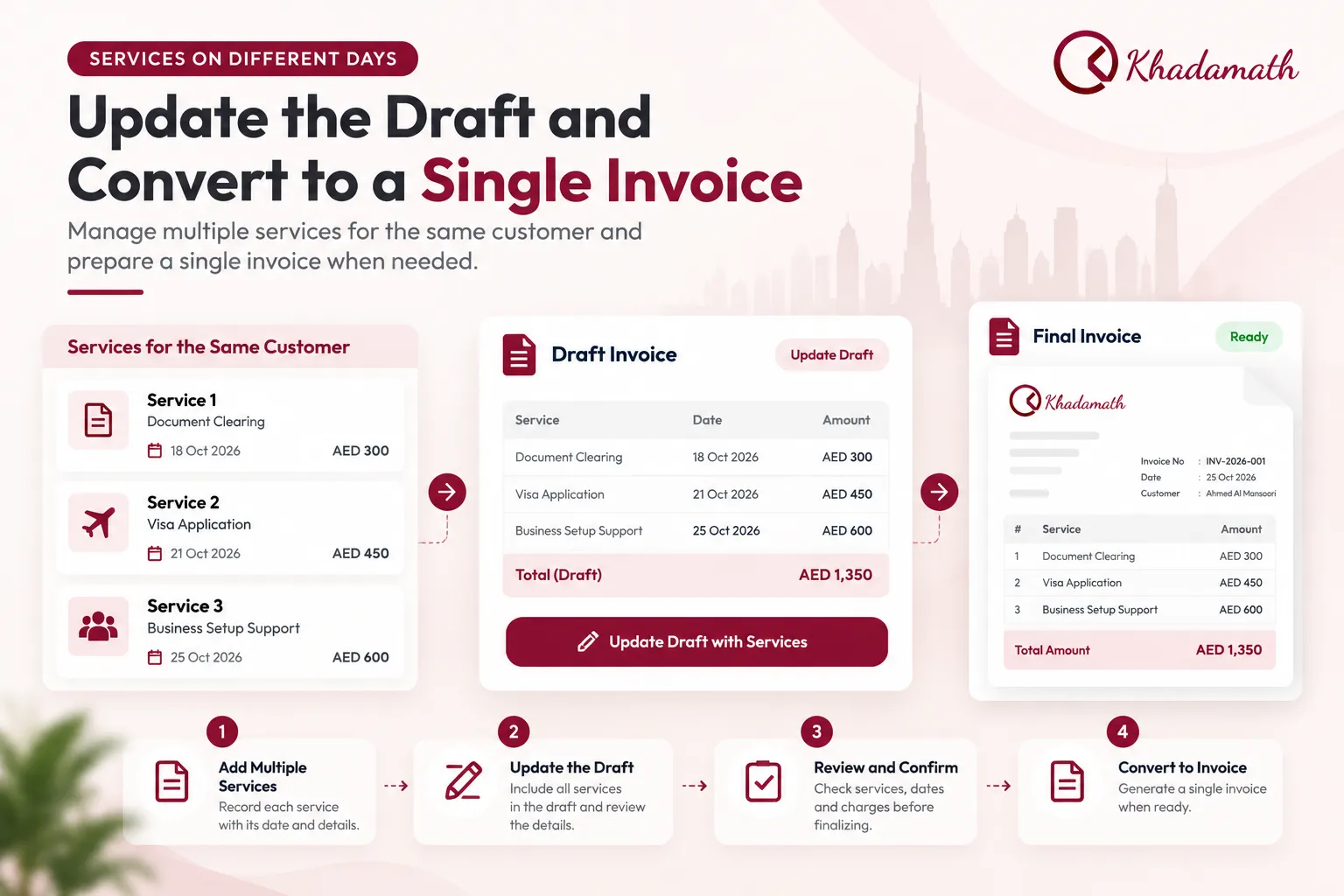
The amounts, dates and invoice details shown in the infographic are illustrative. The image explains a possible workflow and is not a screenshot of the live Khadamath interface.
The exact work-order fields, status rules and detailed service-history behaviour should be confirmed in the live application if they are essential to your business.
Explore the Khadamath software page to review its documented capabilities, or contact the Khadamath team to discuss your workflow.
Conclusion
Managing multiple services for the same customer starts with one accurate customer record and distinct records for individual service requests. Track relevant dates, outstanding information, service progress and billing references so employees can see what needs attention.
Before invoicing, review the service items and the customer's agreed billing arrangement. Use separate invoices or consolidated billing only when appropriate for the work and applicable requirements.
As your business grows, connected customer, service and billing records may become more useful than disconnected spreadsheets. Evaluate software against your real workflow and verify each important capability before adopting it.
Keep Every Customer Service Organized
Manage customer records, services, quotations, drafts, work orders and invoicing workflows with Khadamath. Explore the documented capabilities and see whether they fit your service business.
See Khadamath in Action