5 Signs Your Service Business Has Outgrown Excel
Excel can be useful for a small service business. It can help you maintain customer lists, record expenses, prepare simple calculations, and keep track of day-to-day information.
But as a service business grows, the challenge may no longer be the spreadsheet itself. The bigger issue is that more parts of the business become connected.
Customer information, services, quotations, invoices, payments, expenses, employees, branches, and management reports may all need to work together.
As a service business grows, the question may become: Is my service business still being managed comfortably through the way we use Excel?
There is no fixed number of employees, customers, or branches that automatically means you need to move away from spreadsheets. Instead, look at how difficult your daily operations have become.
Here are five signs that your current spreadsheet-based system may need to be reconsidered.

1. Your Customer Information Is Scattered Across Multiple Files
One of the first warning signs is difficulty finding the customer information your team needs.
A growing service business may have separate spreadsheets for customer details, services, invoices, payments, follow-ups, or other operational information. Different employees may also maintain their own files.
Over time, this can make a simple question surprisingly difficult to answer:
“Where is the latest information about this customer?”

For example, imagine a customer has used several services over time. Their basic information may be in one spreadsheet, previous invoices in another, and payment information somewhere else.
The problem isn't that Excel cannot store this information. It can.
The problem is how many separate places your team has to check and maintain.
Ask yourself:
- Can your team find a customer's information quickly?
- Are customer records duplicated across spreadsheets?
- Does more than one employee maintain customer information?
- Do you have to check multiple files to understand a customer's history?
If these situations happen regularly, your business may be experiencing a data-organization problem rather than simply a spreadsheet problem.
2. Your Team Keeps Entering the Same Information More Than Once
As a service business grows, the same customer and service information can appear in several parts of the workflow.
A typical service business may move through stages such as:
Customer → Service → Quotation → Work → Invoice → Collection → Reporting
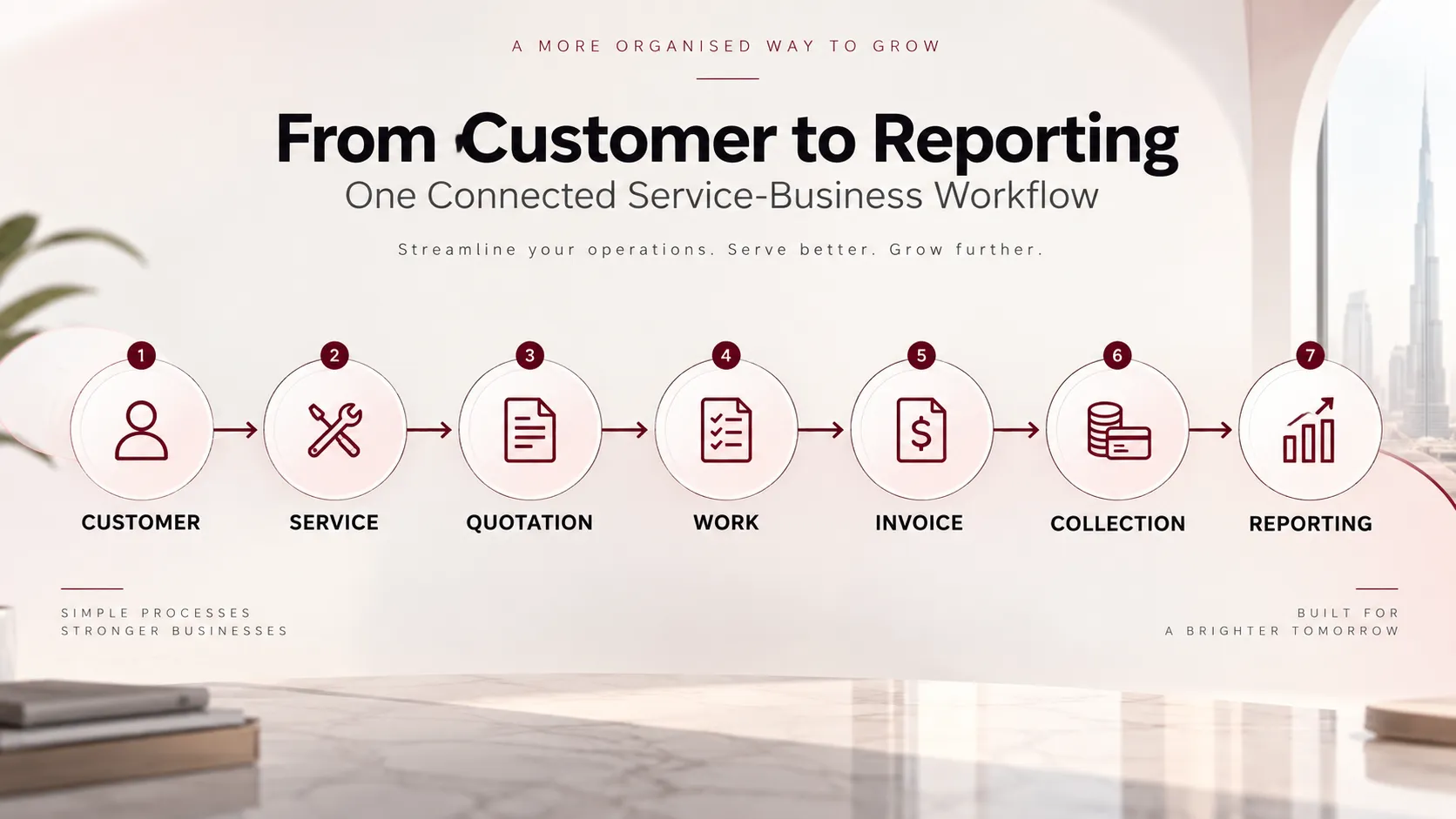
When these activities are managed through separate spreadsheets, information may need to be copied or entered again at different stages.
For example, a customer may first be recorded in a customer sheet. Their requested service may then be entered into another sheet, followed by quotation information and eventually invoice information.
Every additional manual entry creates another point where information may need to be checked and maintained.
This doesn't mean every repeated entry will cause an error. It means that the administrative effort involved in maintaining the information can increase as the workflow becomes more complicated.
Ask yourself:
- Are employees repeatedly copying customer details?
- Are service details entered in several places?
- Do different spreadsheets contain similar information?
- Does updating one piece of information require updating several files?
If the answer is frequently yes, it may be time to consider whether your current system is designed for the way your business now operates.
3. Tracking Invoices and Payments Takes Too Much Manual Work
Billing is another area where a growing service business can begin to feel the limitations of a spreadsheet-based workflow.
You may need to keep track of:
- invoices
- payments received
- pending amounts
- customer balances
- collections
- advances
- billing history
When transaction volumes are small, maintaining these records manually may be manageable.
As the number of customers and transactions increases, however, finding the right information can become more time-consuming.
For example, a manager may want to know:
“Which customers still have outstanding amounts?”
If the answer requires opening multiple spreadsheets, checking invoice records, matching payment entries, and manually calculating balances, the process itself becomes something worth reviewing.
If tracking outstanding amounts is becoming difficult, see our guide on how to track outstanding payments in a service business for practical ways to organize invoices, payments, customer balances, and follow-ups.
Ask yourself:
- Can you quickly identify outstanding customer amounts?
- Is payment information maintained separately from customer information?
- Does your team manually reconcile invoice and payment records?
- Is it difficult to see a customer's billing history?
The issue is not whether Excel can track this information. It can. The question is whether your current process makes that information easy enough to manage as the business grows.
4. Management Reports Require Manual Consolidation
Business data is only useful when you can turn it into information that helps you understand operations.
A service business may want to review things such as:
- revenue
- collections
- expenses
- customer activity
- staff activity
- supplier information
- branch performance
- daily operations
If this information is stored across multiple spreadsheets, preparing a management report may involve collecting information from different files and combining it manually.
That can make reporting a recurring administrative task rather than a straightforward management activity.
For example:
“How much did we collect this month, and how much is still outstanding?”
or
“Which expenses increased this month?”
If answering questions like these requires substantial spreadsheet preparation every time, your reporting process may have become more complicated than it needs to be.
As part of reviewing your financial records, learn how to track business expenses in a service business to organise expense records and review spending more consistently.
Ask yourself:
- Do you regularly combine data from several spreadsheets to create reports?
- Does preparing management reports take significant manual effort?
- Are reports difficult to update when new information is added?
- Do managers have to wait for someone to prepare the numbers before reviewing them?
A reporting problem can be a sign that the business needs a more connected way of organizing its operational information.
5. More Users or Branches Are Making Excel Harder to Control
A spreadsheet managed by one person is different from a business where several employees and branches need access to operational information.
As a service business expands, you may have:
- multiple employees
- different responsibilities
- multiple branches
- branch-specific information
- different levels of access
- a need for accountability
At this stage, the question changes from:
“Can Excel store this information?”
to
“Can our current process keep this information organized and controlled across the people using it?”
For example, if different employees maintain different versions of information, management may need to spend additional time checking which records are current.
Similarly, a business operating from multiple locations may need a clearer way to organize branch-related information.
Ask yourself:
- Are multiple people maintaining the same business information?
- Are you dealing with different spreadsheet versions?
- Do different branches need access to business information?
- Do you need clearer control over who can access certain operational information?
- Is it becoming harder to maintain consistency between locations?
Again, this does not mean Excel cannot be used in a multi-user or multi-branch environment. It means that the operational requirements of the business may have become more sophisticated than the way spreadsheets are currently being used.
Excel Isn't Necessarily the Problem
It is important not to interpret these signs as meaning that every service business should stop using Excel.
Excel can still be useful for:
- simple calculations
- temporary analysis
- small datasets
- ad-hoc reporting
- specific tasks alongside other business systems
The decision should instead be based on business complexity.
If your customer records are organized, billing is easy to track, reporting is straightforward, and only a small number of people need access, Excel may still be sufficient for some tasks.
But if your team is repeatedly dealing with scattered information, duplicate data entry, difficult billing tracking, manual reporting, and increasing user or branch complexity, it may be worth evaluating a dedicated business-management system.
What Should You Look for When Moving Beyond Excel?
If your business is experiencing several of these problems, don't choose software simply because it has more features.
Start with the problems you need to solve.
If you're comparing software options, it can also help to understand how business management software differs for product-based and service-based businesses .
Centralized Customer Records
Customer information should be organized in a way that makes it easier for authorized team members to access and manage relevant records.
Connected Service and Billing Management
Look for tools that support the way your business handles services, quotations, work, drafts and invoices.
Invoice and Payment Visibility
The system should help you organize billing information and understand customer balances and collections.
Reporting
Consider what reports management actually needs rather than simply counting the number of reports a software product offers.
User and Branch Management
If multiple employees or locations are involved, check whether the system supports the required users, branches and access controls.
Expense and Operational Tracking
A service business may also need to manage expenses, suppliers, staff and other operational information alongside customer and billing data.
The right choice depends on your business workflow, size, processes and requirements.
How Khadamath Can Fit a Growing Service Business
For UAE service providers looking beyond spreadsheet-based management, Khadamath is positioned as a business-management and billing system built around service-business operations.
Its documented capabilities include customers, services, quotations, drafts, invoicing, work orders, expenses, suppliers, staff, branches, users and reporting.
That means the areas discussed throughout this article can be considered together rather than treating every activity as a completely separate spreadsheet.
| Business challenge | Relevant Khadamath capability |
|---|---|
| Customer information spread across files | Customers and Client Statements |
| Repeated billing-related information | Services, Quotations, Drafts and Invoices |
| Difficulty tracking collections | Collections and Customer Advances |
| Manual management reporting | Operational and financial reports |
| Multiple users or branches | Users, Branches and permissions |
| Expense information in separate records | Expenses and Expense Groups |

Khadamath's documented reporting system includes reports covering areas such as profit, client statements, cash book, collections, expenses, users, inactive clients and customer advances. Premium also includes Trial Balance, Balance Sheet and P&L reports.
The software is specifically positioned toward UAE service-provider categories including typing centres, ID centres, travel agencies, PRO service providers, document-clearing businesses and other service-based SMEs.
How Do You Know If You're Ready to Move Beyond Excel?
There isn't a universal checklist where reaching a particular number of employees automatically means your business needs new software.
Instead, look at the frequency and impact of the problems you're experiencing.
Ask yourself:
- Are customer records becoming difficult to organize?
- Is your team repeatedly entering the same information?
- Is invoice and payment tracking taking more manual effort?
- Do management reports require combining information from several spreadsheets?
- Are multiple users or branches creating additional control and organization challenges?
If several of these problems occur regularly, it may be useful to evaluate whether your current spreadsheet-based process is still appropriate for your business.
The goal isn't to stop using Excel simply because your business is growing.
The goal is to make sure the system you use can keep up with the way your business operates.
Conclusion
Excel doesn't suddenly become unsuitable because a service business reaches a particular size.
The more useful question is whether your business processes have become too interconnected and complex for your current spreadsheet-based system to manage comfortably.
Scattered customer information, repeated data entry, difficult invoice and payment tracking, manual reporting, and increasing user or branch complexity are five signs worth paying attention to.
If these problems are becoming regular parts of your team's day, it may be time to evaluate a dedicated business-management system and compare the available options against your actual workflow.
For UAE service businesses looking for a system that brings customer, billing, operational, branch, user and reporting functions together, Khadamath is one option to evaluate based on its documented capabilities.
Ready to Run Your Service Business More Efficiently?
Manage customers, services, quotations, invoicing, collections, expenses and daily operations in one connected platform with Khadamath.
See Khadamath in Action